
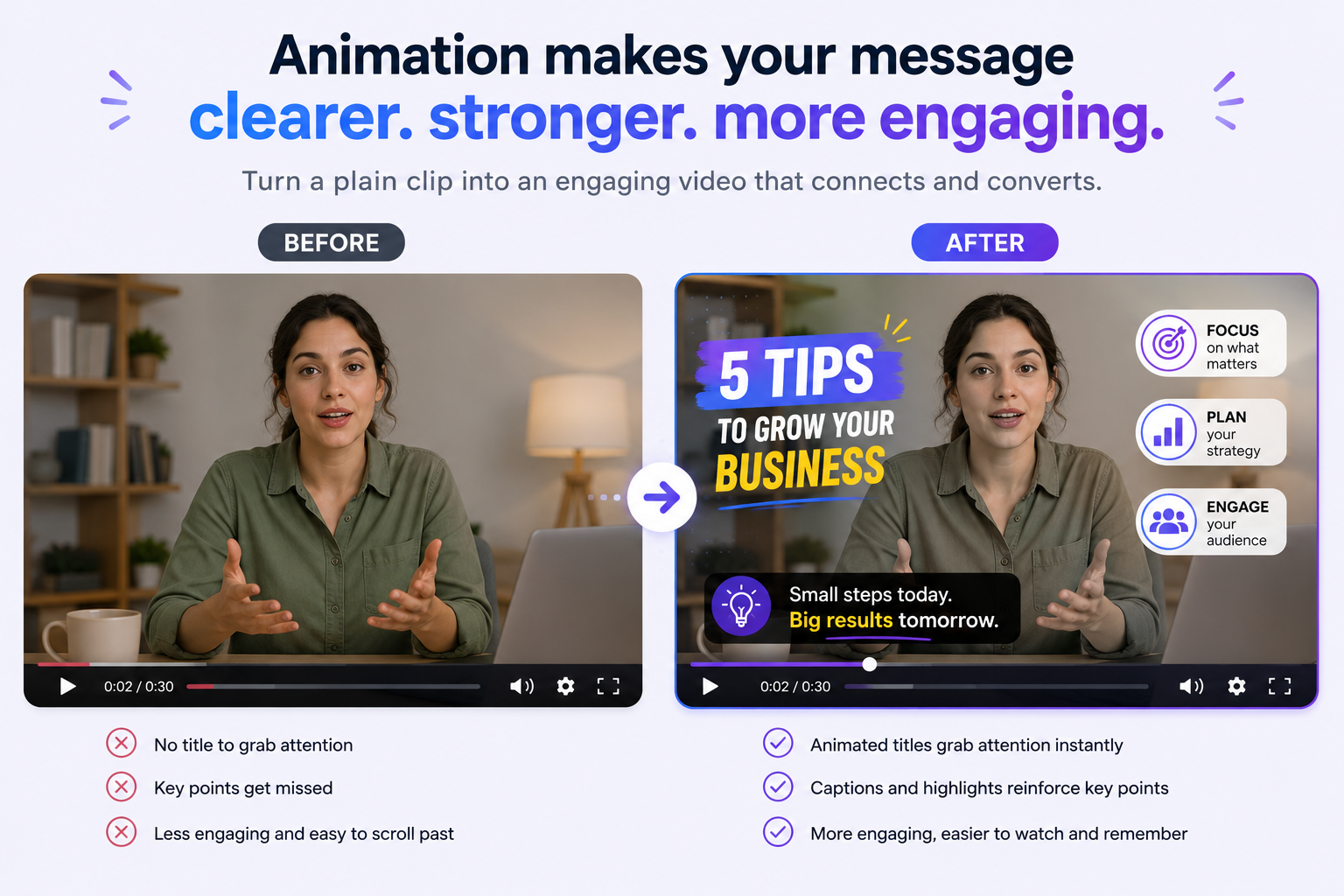
| Quick SummaryAnimation helps video content capture attention, explain ideas clearly, and keep online audiences engaged for longer. Animated captions or motion graphics can improve accessibility and make videos more memorable. |
Live video can sometimes be limited by reality. Animation breaks those limits, giving you entirely new ways to explain complex ideas. Instead of just showing a talking head, motion keeps your viewers actively watching. Best of all, you do not need a massive budget or a production crew to use them.
Adding even a tiny bit of movement can completely transform your content. The proof is in the numbers. A massive 96% of people have watched an animated explainer video to gain more information about a particular product or service. This guide shows exactly where animation makes sense, and how to drive real results.
Table of Contents
What Does Animation Add to Video Content?
How Does Animation Improve Engagement and Retention?
What Are Ways to Enhance Your Video Content With Animation?
How Does Animation Impact Accessibility for Online Audiences?
How to Choose the Right Type of Animation?
What Does Animation Add to Video Content?
Animation adds movement and clarity to video content that static frames rarely achieve on their own. It turns a flat point into motion the eye can follow. That motion can be a fully animated explainer or small graphics layered onto real footage.
Generally speaking, creators take two main approaches to content animation. The first option is standalone animation. With this style, the entire video is drawn or rendered from scratch, much like a cartoon.
The second approach is layering. Instead of animating everything, you simply add moving elements to a live video. Think of floating captions, animated name tags, or charts that build right on screen.
Both methods work well. However, most online creators prefer layering because it is fast. Plus, it works perfectly with footage they already own.
The main goal of adding motion is to grab attention. Movement instantly signals that something important is happening. That split-second cue slows down the scroll and holds a viewer just a little bit longer.
| What Does Animation Add to Video Content?For most online creators, adding simple motion graphics to existing clips can increase their dynamism, clarity, and ultimately, engagement. |
How Does Animation Improve Engagement and Retention?
Movement naturally grabs the human eye. Animation leverages this to hook viewers and keep them watching longer. Motion also helps people remember what they saw.
The data strongly backs this up. Wyzowl’s 2026 research shows that 93% of marketers say video directly improves how well customers understand their product.
Video length plays a massive role here as well. Engagement rates reduce the longer videos drag on, per Wistia’s 2026 State of Video report. So, if you want to hold focus for longer, short animated explainers are the way to go.
Image via Wistia
Online audiences scroll incredibly fast. The first few seconds of your video will have to play a decisive role. A quick animated hook or a moving title can stop viewers mid-scroll and earn you their time. This technique relies on the same psychological pull that keeps people binge-watching their favorite shows.
| How Does Animation Improve Engagement and Retention?Adding animation to your videos naturally increases viewer understanding and total watch time. For online audiences, short, snappy animated clips always perform the best. |
What Are Ways to Enhance Your Video Content With Animation?
You can polish almost any video with animation in minutes, even without design skills. Start with the parts viewers notice first, then work through the clip. The highest-impact touches are simple:
- Animated intros and logos that brand the first three seconds
- Motion-graphic lower-thirds that name a speaker or product
- Kinetic captions that keep muted viewers reading along
- Animated data callouts that make a single number land
- Smooth transitions that guide the eye between shots
- An animated end card that points to your next step
You can easily build these graphics using a free animation maker like Adobe Express or Canva then simply drop them onto your clip. To start, pick just one technique per video. This ensures your motion feels intentional rather than cluttered and busy.
If you post to social feeds, match the animation to the platform’s specific style. The same habits you use to manage your brand on social media apply here too.
| What Are Ways to Enhance Your Video Content With Animation?Start small. Add one animated caption or lower-third to your next video before you try a full motion-graphics pass. |
How Does Animation Impact Accessibility for Online Audiences?
Animation can be used in various ways to make videos more accessible to online audiences. Animated captioning is an especially poignant example.
According to Wistia’s 2025 Report, the use of captions in online videos grew 572% between 2021 and 2025. This trend can be attributed to a growing preference for watching videos on mute.
Animated captions help convey the message to viewers who have turned off the sound on their devices. Animated captions also benefit non-native English speakers. They give viewers time to process the auditory information on the screen.
Simple animated visuals can provide context for the visual information presented in the video. Such animations are useful when you’re explaining something that requires breaking down and building up ideas one after another.
However, it’s important not to get carried away when incorporating other animated graphics while editing videos. Animated captions should be used only when necessary to clarify meaning.
Some viewers can get motion sickness when watching videos with too many animated features. Only the key elements should be animated while the others remain static.
| How Does Animation Impact Accessibility for Online Audiences?Accessibility is reach. Captions and clear motion help muted, mobile, and non-native viewers stay with your video. |
How to Choose the Right Type of Animation?
When choosing an animation style, you should always focus only on your goal. Every style serves a distinct purpose, depending entirely on the kind of video you want to create:
- Motion graphics work best for displaying data, text overlays, and quick explainer videos
- 2D or character animation is perfect for emotional storytelling and building a distinct brand personality
- Whiteboard animation shines when you need to break down step-by-step teaching concepts
- 3D animation is the ideal choice for showing off product details or spatial, three-dimensional demonstrations
That said, you should completely skip animation when a real human face or a live demonstration would build more trust. For example, a customer testimonial video rarely needs a cartoon layered on top.
| How to Choose the Right Type of Animation?Match the style to the job. Use motion graphics for information, character work for story, and live video for authenticity. |
FAQ
1. How Does Animation Enhance Video Content?
Used well, animation for video content holds attention and explains ideas faster. It can be a full animated video or small graphics added to footage you already have.
2. Does Animation Actually Increase Engagement?
Yes. Motion draws the eye and helps viewers remember your message. Short animated clips also hold attention longer than long, static ones on busy social feeds.
3. What Types of Animation Are Used in Video Content?
Common types include motion graphics, 2D and character animation, whiteboard animation, and 3D. Many creators also add animated captions, lower-thirds, and transitions to live footage.
4. How Do You Add Animation to an Existing Video?
Import your clip into an online editor, then layer on animated captions, titles, or graphics. Tools like Adobe Express let you drag ready-made motion elements onto footage without design skills.
5. Is Animated Video Better Than Live-Action?
Neither is always better. Animation explains abstract ideas and stretches a budget, while live-action builds personal trust. Many strong videos blend both.
6. Are Animated Videos Cost-Effective to Make?
They can be. Animation avoids filming crews, locations, and reshoots. Free online tools now handle much of the work so that small teams can produce polished clips affordably.
7. How Does Animation Help Accessibility?
Animated captions let people watch with the sound off, and clear on-screen text supports non-native speakers. Simple visuals also make complex topics easier for a wider audience to follow.
8. Why Does Animation Work Well on Social Media?
Social feeds autoplay on mute and scroll fast, so moving titles and captions stop the scroll. That makes animation a natural fit for short social clips.
Conclusion
Animation is a great way to capture and engage a highly distracted audience. Contrary to what many people think, animation is not just about using cartoon characters to make content more fun. It’s about guiding the viewer’s eyes exactly where you want them and communicating visually.
For your first animated video, you can start with something simple, like a few animated captions or even a short branded intro. Analyze the engagement the video receives. This will help you know how to approach your next explainer video. With only a few small adjustments, your everyday clips will look much sharper and reach a lot further.
