
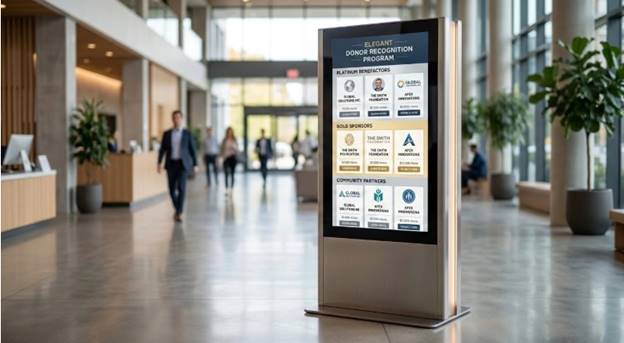
Replacing static brass plaques with digital displays is a standard move for capital campaigns today. I’ve seen plenty of organizations rip out old wooden boards only to replace them with a TV running a generic PowerPoint loop. That completely misses the point of modern donor stewardship. A good recognition wall needs to actually tell the story of the people who funded the building. It also requires a backend system that development staff can update without opening a ticket with the IT department.
Many facilities make the mistake of buying the hardware first. They mount a massive commercial display in the lobby and then spend six months trying to figure out what software to run on it. That backward approach usually leads to a clunky user experience. You should always determine your content strategy and software platform before running electrical conduit and reinforcing drywall. You want a system that handles data gracefully when a major sponsor changes their corporate name or when an alumni record needs an immediate correction.
When an organization secures a major gift, the physical environment must reflect that contribution appropriately. Physical lettering eventually runs out of wall space and requires expensive etching for every new update. Digital walls solve the footprint problem but introduce new operational requirements like software licensing, media management, and hardware maintenance.
1. Touchstone Digital Solutions
When institutions want a fully branded display that doesn’t look like an off-the-shelf software template, they usually look for a dedicated builder. Touchstone Digital Solutions focuses exclusively on custom touchscreen installations for schools, universities, and nonprofits.
Unlike platform vendors that sell a software license and leave the layout work to your team, they handle the visual identity and content structure from the ground up. Most development offices lack a dedicated web developer on standby. When a new sponsor reaches a giving tier, a staff member needs to update the wall immediately. They solve this by building a customized content management system around the specific data fields the institution uses.
Key advantages for organizations include:
- Interfaces built specifically around your local history and capital campaigns
- A backend platform designed for non-technical administrative staff
- Ongoing dedicated support rather than a generic help desk ticket system
Because recognition displays are their primary focus, clients do not have to force a generic signage product to fit a donor wall application.
2. Norvision
Managing large giving programs requires specific software architecture. Norvision focuses narrowly on donor recognition software. Their managed platform scales effectively whether you are running a localized giving program or a massive multi-tiered capital campaign.
A fifty million dollar capital campaign has complex recognition rules. Norvision handles the logic of categorizing sponsors automatically as their lifetime giving increases. That backend focus is highly practical for large university endowments and hospital foundations where tracking cumulative donations is a daily task. The software needs to reflect those changing tiers without requiring a complete redesign of the screen layout.
Their narrow focus is a distinct advantage for fundraising teams. It can present a limitation if your facility needs to combine multiple recognition types. If an athletic department wants a sports hall of fame and the development office wants a donor wall, you might end up running two separate software systems to handle the different data structures. Operating distinct platforms creates isolated data silos that complicate long-term maintenance.
3. Digital-Trophy-Case.com
Sometimes an organization just wants a turnkey hardware and software package handled under a single purchase order. Digital-Trophy-Case.com sells interactive touchscreen kiosks generally ranging from 43 to 65 inches.
Their offering centers on searchable cloud-managed profiles tied directly to their hardware packages. It does exactly what the name implies without overcomplicating the installation.
- Searchable honoree directories that are easy to navigate
- Fixed hardware sizes for predictable physical installation
- A straightforward cloud-managed backend
The format is highly functional but leans heavily on the directory structure. Facilities wanting deep multimedia storytelling or sweeping timeline interfaces might hit a ceiling with this specific setup.
4. Rise Vision
If you just need to get a screen on the wall quickly and cheaply, Rise Vision offers an entirely different approach. They provide an all in one cloud platform primarily designed for general digital signage across campuses.
Their system includes hundreds of templates for everyday tasks like classroom announcements and emergency alerts. Among those are basic templates for donor walls. A high school putting screens in the main hallway can easily rotate a lunch menu with a basic sponsor list.
- Instant screen updates from almost any web device
- A very low barrier to entry for tight department budgets
- Broad utility beyond just donor recognition
The tradeoff is deep customization. The templates are standard. Institutions looking for a highly distinctive storytelling tribute usually find they outgrow these out of the box designs quickly.
5. Nevco
Athletic departments often look to vendors they already have existing relationships with. Nevco manufactures athletic scoreboards and gym branding elements. They also offer digital wall of fame displays in various wall mount and floor stand configurations.
Because their core business revolves around stadium and gym equipment, their digital recognition products are heavily hardware focused. Gyms and arenas have specific mounting and durability needs. A screen placed near a concession stand needs a commercial grade enclosure. Nevco handles the enclosures and the physical installation alongside other facility branding projects. Their displays integrate naturally into a broader athletic environment. If you need a rugged enclosure for a high traffic basketball lobby, an athletic vendor understands that physical space perfectly.
The software side is less specialized compared to firms that build their entire infrastructure around the interactive honoree experience. You might not get a deeply customized content management system, but Nevco makes complete sense if you are already ordering a new scoreboard and want to add a durable screen to the lobby on the exact same invoice.
6. Intuiface
Intuiface offers a robust no code platform that combines video, images, and touch navigation. It is heavily utilized by digital agencies and AV integrators for corporate exhibits and trade show kiosks.
This is a horizontal software tool. It handles broad interactivity well and even integrates with external sensors or IoT devices. Schools and nonprofits need to know that it lacks a dedicated alumni or donor data structure out of the box. You are buying a highly capable toolbox rather than a finished house. You will either need internal design expertise or an outside agency to build the actual recognition experience on top of their software layer.
- Combines multiple media formats easily
- Supports advanced touch and sensor interactions
- Requires significant manual configuration for donor databases
7. PandaSuite
Some teams have a strong internal creative department and want total hands on control over the layout. PandaSuite is a no code interactive display builder that works exceptionally well for this scenario.
It is a highly flexible drag-and-drop tool used across multiple industries. You essentially start with a blank canvas. That means your staff is responsible for designing the honoree structure, organizing the donor tiers, and setting up the screen logic. Mapping out a database schema for 500 alumni takes serious work. You need someone with practical UX experience to make the touch interface intuitive for visitors. If a user cannot find a specific sponsor within three taps on the screen, the design has failed.
Consider this option if:
- You have in-house designers ready to build the interactive interface
- You want to manage all ongoing design and upkeep internally
- You prefer a standard monthly software subscription model over a fully managed service
If you have the internal bandwidth, this platform saves you the upfront cost of hiring a managed agency. It just transfers the heavy lifting to your own payroll.
